

The quick answer
Standing at the cereal shelf wondering which box is the better pick? Dete's health rating sums it up with one badge on the product, so you can compare products at a glance before anything goes in the trolley.
We make Dete by Discount Trolley. Here is how to check a product's health rating in the app, in four steps. The screens below are from the app on 22 October 2026.
- Search for a product. Look for Dete's badge on each result.
- Open the product and tap the health rating.
- See what raises or lowers the score, per 100 g. Check Sources and How we rate.
- Tap sort and pick Health rating: best first.
Step 1: Search for a product and look for the badge
Open Dete and tap Search at the bottom of the screen. Type what you are after. We searched for cereal.
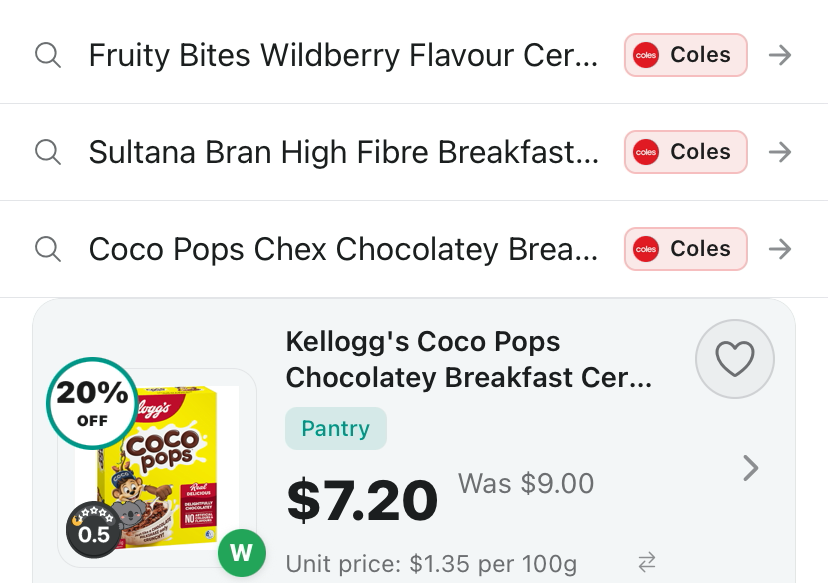
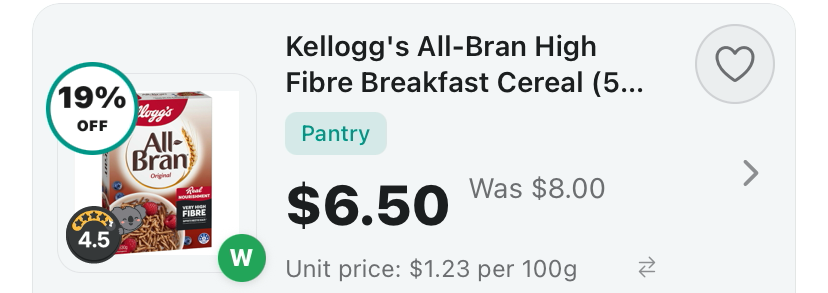
Each result has a small round badge on the product photo with a koala and a score. That is Dete's health rating. In our search, Kellogg's Coco Pops showed 0.5 and Kellogg's All-Bran High Fibre showed 4.5, so the gap was clear before we opened either one.
- Tap Search and type a product, brand or category.
- Find the round badge on the bottom left of each product photo.
- Compare the scores down the list. A higher score is a better rating in Dete.
Step 2: Open the product and tap the health rating
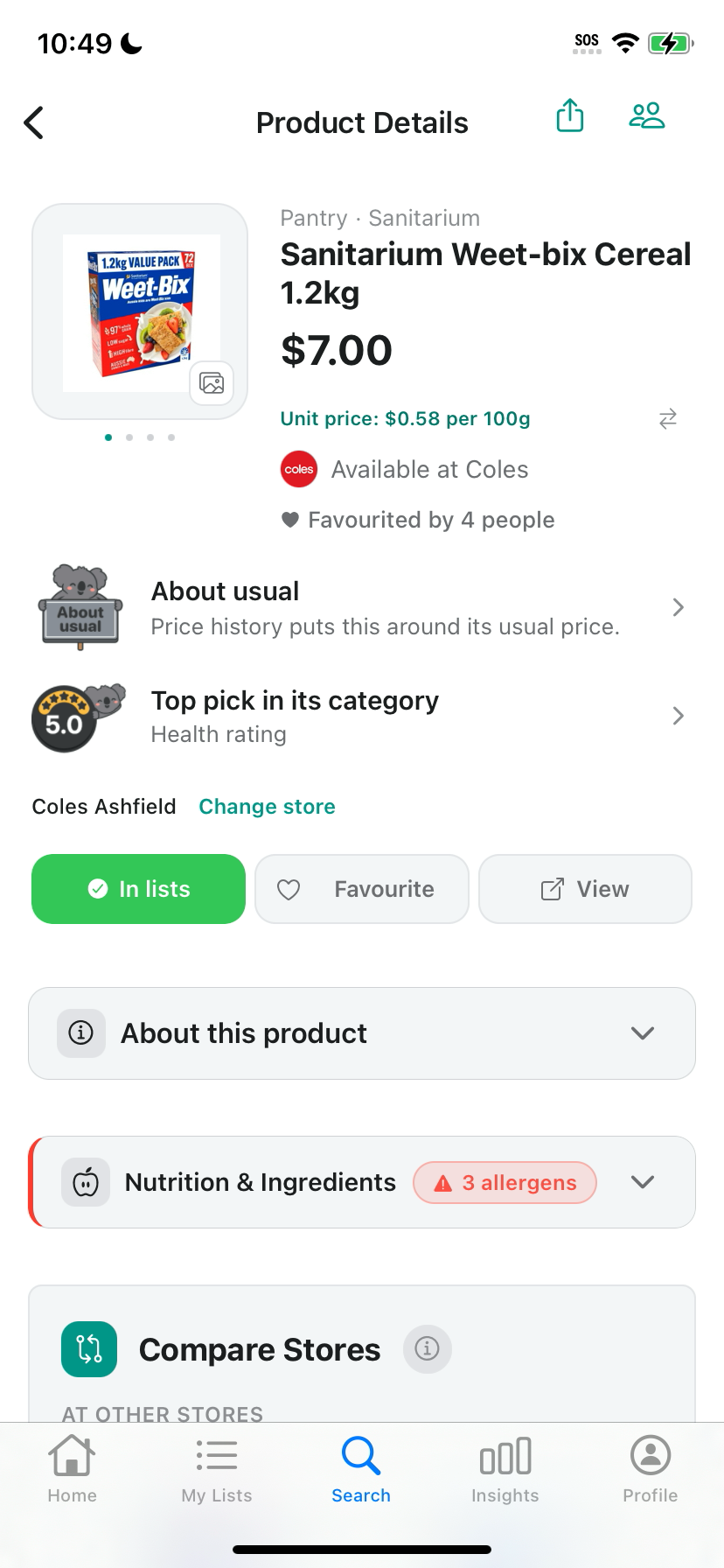
Tap a result to open Product Details. Below the price and store, look for a row with the same badge and a short label. For Sanitarium Weet-bix Cereal 1.2kg at Coles, the row read Top pick in its category, with Health rating underneath.
Tap that row to open the full health rating.
- Tap a product in the results.
- Find the row with the badge and the word Health rating.
- Tap the row to open the health rating sheet.
Step 3: See what raises or lowers the score
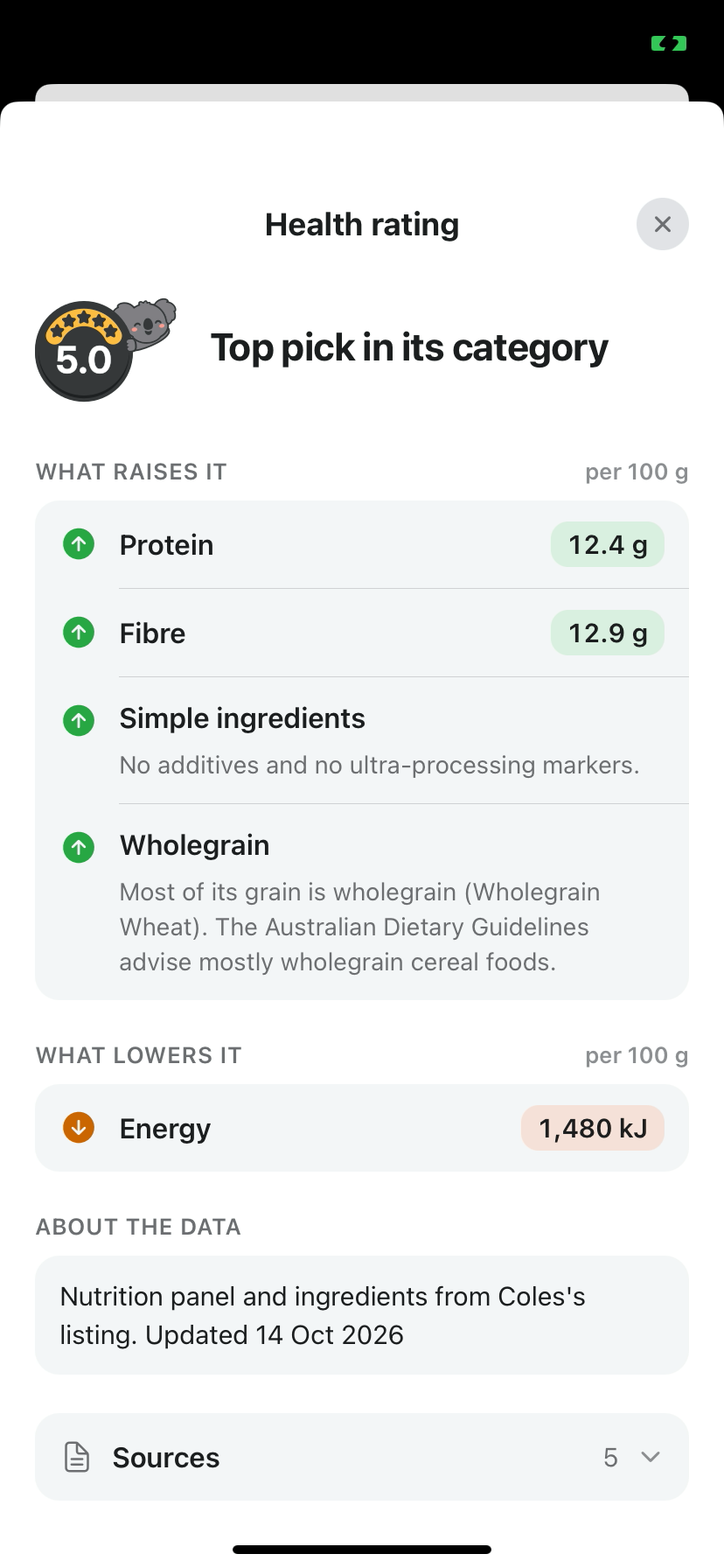
The sheet shows the score at the top with a label, then splits the reasons into What raises it and What lowers it. Nutrients are shown per 100 g, so you can compare two products of different pack sizes fairly.
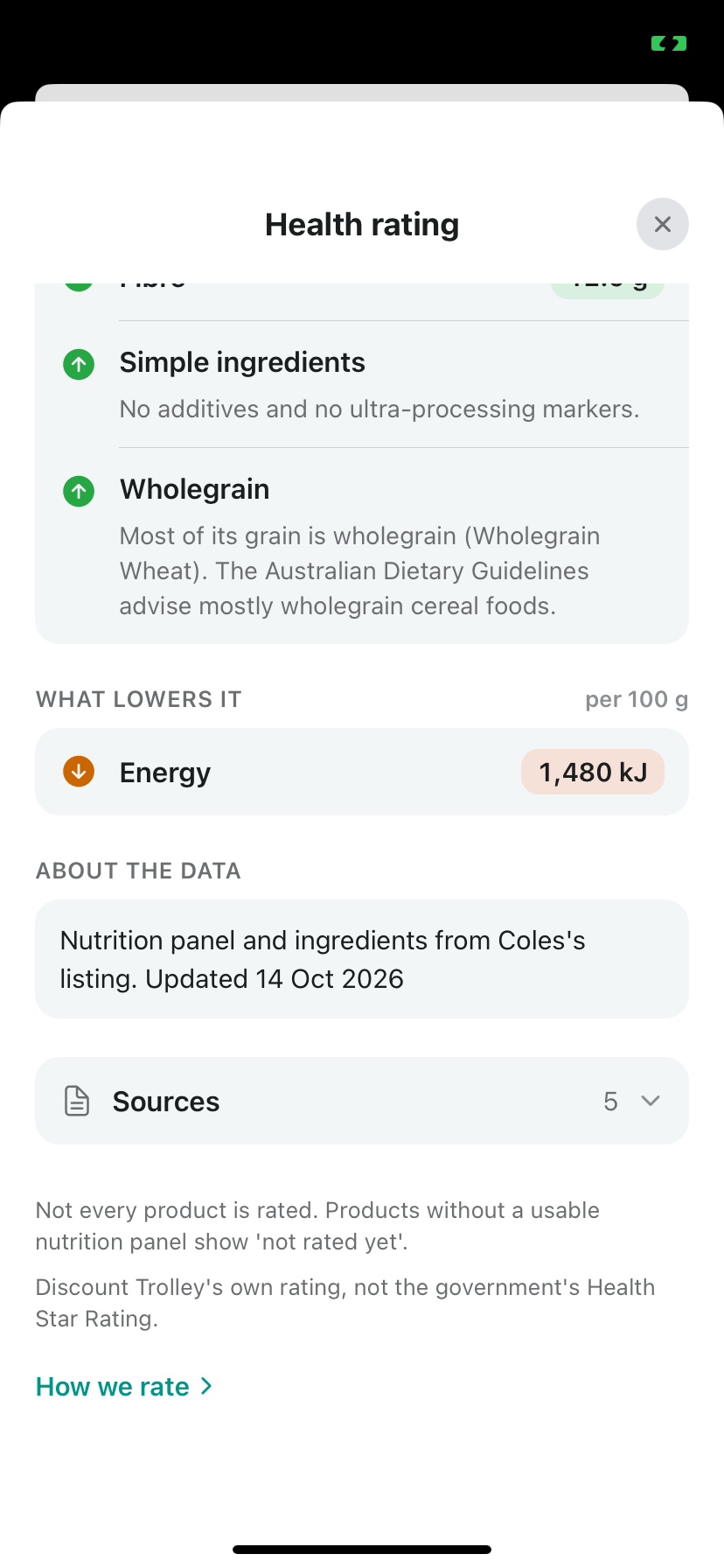
Sanitarium Weet-bix scored 5.0, Top pick in its category. What raises it: Protein 12.4 g, Fibre 12.9 g, Simple ingredients and Wholegrain. What lowers it: Energy 1,480 kJ.
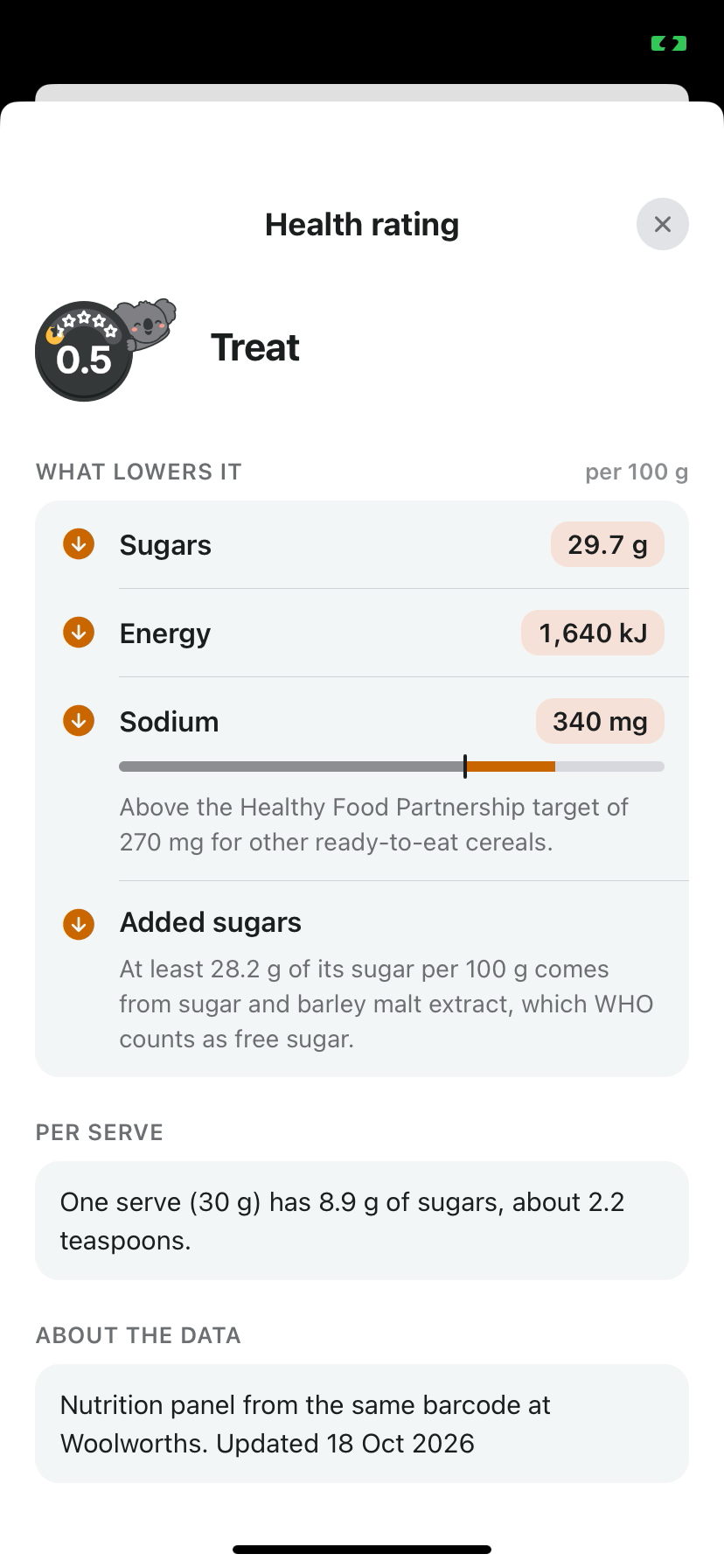
Kellogg's Coco Pops scored 0.5 and the label read Treat. What lowers it: Sugars 29.7 g, Energy 1,640 kJ, Sodium 340 mg and Added sugars. Some lines add a short note in plain words explaining them.
Scroll down to About the data. It tells you where the nutrition panel came from and when it was updated. For Coco Pops, the app said the nutrition panel came from the same barcode at Woolworths, updated 18 Oct 2026.
Check Sources and How we rate
Keep scrolling and you will find Sources, with a count next to it. Tap it to see every source behind the rating.
Below Sources, the app is upfront about two things. Not every product is rated, and products without a usable nutrition panel show 'not rated yet'. And it is Discount Trolley's own rating, not the government's Health Star Rating.
Tap How we rate for a plain guide to how the score is worked out.
- Tap Sources to see where the data came from.
- Tap How we rate to read how the score works.
Step 4: Sort your search by Health rating: best first
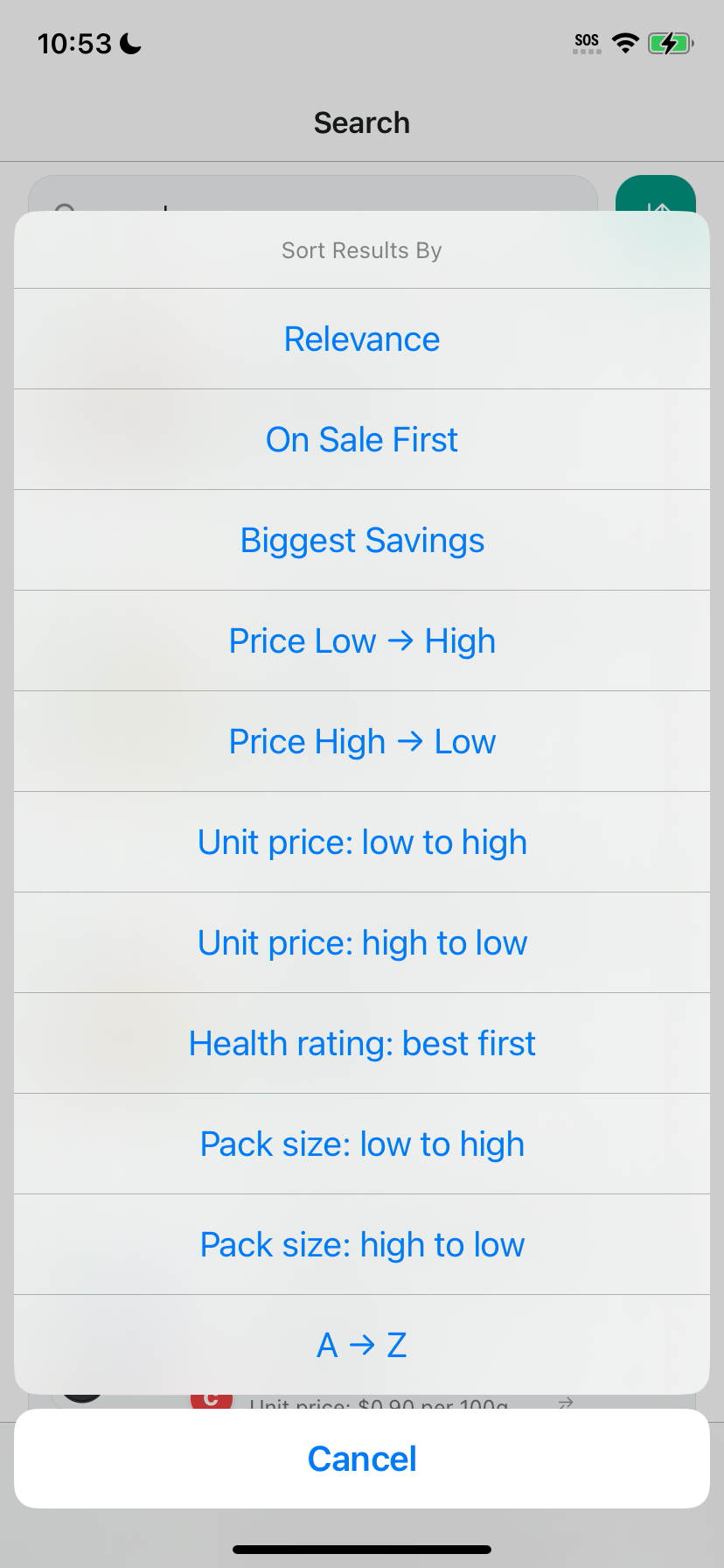
Back on the results, tap the sort button next to the search bar. A Sort Results By menu opens. Pick Health rating: best first.
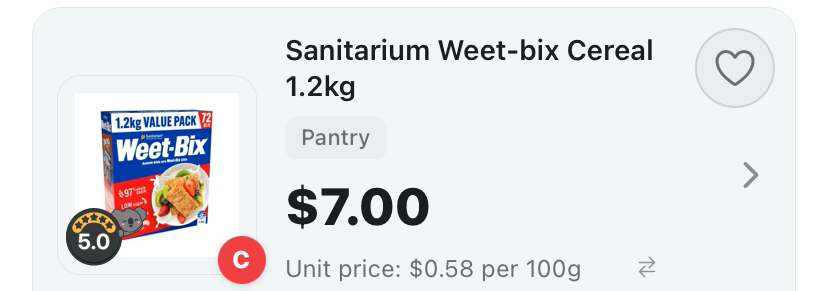
The highest rated products move to the top. When we sorted our cereal search, Sanitarium Weet-bix Cereal 1.2kg at 5.0 came up first.
- Tap the sort button to the right of the search bar.
- Pick Health rating: best first.
- Scroll the list from the top down.
What the health rating is, and what it is not
It's Discount Trolley's own rating, not endorsed by FSANZ, the NHMRC, the TGA or the Australian Government, and a guide, not medical or dietary advice.
It is not the government's Health Star Rating, and it does not have to match what a store shows. You may see a Dete rating on a product where the store shows none. Use it to compare products side by side, then make the call that suits you.
For more on how the score is worked out, and what the labels mean, see Discount Trolley health rating explained.
Where else you will see the badge
The same badge shows up across the app, so you do not have to search every time.
- Search results and product cards.
- Your shopping list.
- Your saved items.
- The barcode scanner result, when you scan a product.
Tips for your next shop
Compare within the same kind of product. A cereal against a cereal tells you more than a cereal against a snack bar.
Open the sheet, not just the badge. Two products can land on a similar score for different reasons, and the raises and lowers lines show you which.
Check the date in About the data. The pack in your hand can differ from the panel the app used, so read the label if something looks off.
More Dete guides
New to the app? Start with how to use Discount Trolley before your weekly shop. Once you have your list sorted, learn how to read Dete's when-to-buy signs, how to send your shopping list to the store's online trolley, and how to add Dete widgets to your Home Screen.
You can find all our Dete guides in one place.
Get the app
Search Dete on the App Store or Google Play to get Dete by Discount Trolley on iPhone or Android. Free to try on the App Store.
Questions shoppers still ask
Is Dete's health rating the government Health Star Rating?
No. It is Discount Trolley's own rating, not the government's Health Star Rating. It does not have to match what a store shows, and you may see a Dete rating on a product where the store shows none.
How do I check a product's health rating in Dete?
Search for the product and look for Dete's badge on the result. Open the product and tap the health rating row to see what raises or lowers the score, per 100 g.
What does a high or low score mean?
A higher score is a better rating in Dete. The label sums it up. In our cereal search on 22 October 2026, Sanitarium Weet-bix scored 5.0, Top pick in its category, and Kellogg's Coco Pops scored 0.5, Treat.
Why does a product say not rated yet?
Not every product is rated. Products without a usable nutrition panel show 'not rated yet'.
Can I sort products by health rating?
Yes. In search results, tap the sort button next to the search bar and pick Health rating: best first.
Where does the rating data come from?
Open the health rating sheet. About the data says where the nutrition panel came from and when it was updated, and Sources lists every source. How we rate explains how the score works.
Is the health rating medical advice?
No. It's Discount Trolley's own rating, not endorsed by FSANZ, the NHMRC, the TGA or the Australian Government, and a guide, not medical or dietary advice.
Woolworths, Coles, ALDI, IGA, Harris Farm, Priceline and Chemist Warehouse where data is available. Not affiliated with those stores. The shelf can differ from the screen. Live prices need a connection.

Check health ratings while you shop with Dete by Discount Trolley.
Search a product, tap the badge and see what raises or lowers the score, per 100 g, with every source listed.
- Health rating badge on search results and product cards
- What raises or lowers the score, per 100 g
- Sort by Health rating: best first